You can post to multiple social media accounts at once in one of four ways: native cross-posting, a scheduler, an automation tool like Zapier, or an API call. Which fits depends on whether your accounts sit in one company's ecosystem. Meta covers Facebook, Instagram, and Threads at no cost. Add X, LinkedIn, TikTok, or Pinterest and native tools run out.
Key takeaways
- Online adults use an average of 6.75 social platforms a month, so one network reaches a fraction of your audience.
- Caption limits span 280 to 5,000 characters across the seven networks, so one identical caption is always wrong somewhere.
- Watch per-account pricing: some schedulers bill a second account on the same network as a separate slot.
Can you post to every network at once?
Not from any one platform's own tools. In 2026, online adults use an average of 6.75 different social platforms each month, according to DataReportal's Digital 2026 Global Overview Report (DataReportal, 2026). Your audience is spread across roughly seven apps, but no single platform will post to more than its own.
Meta documents cross-posting across Facebook, Instagram, and Threads inside Business Suite (Meta Business Help Center), and that covers three of the seven networks most brands care about. X, LinkedIn, TikTok, and Pinterest each publish only to themselves. No native tool spans all of them, which is the entire reason the scheduler category exists.
So the practical answer: use native tools if you are Meta-only, and a scheduler if you are not. Most brands discover they are in the second group faster than they expect. One client asks for LinkedIn, one campaign needs Pinterest, and suddenly Business Suite covers half your work.
What are the four ways to do it?
Each method trades setup effort against reach. Here's the honest breakdown, with the point where each one stops working.
| Method | Cost | Where it breaks |
|---|---|---|
| Meta Business Suite | Free | Nothing outside Meta |
| Social media scheduler | Free tier to paid | Per-account pricing varies a lot |
| Zapier / n8n / Make | Paid above small volumes | Fragile; each network is a separate step |
| Direct API | Developer time | You maintain seven integrations |
So is one click across every network realistic? Yes, but only through a tool built for it. Each method above can post to multiple social media accounts at once. Where they part ways is how many of the seven they actually reach.
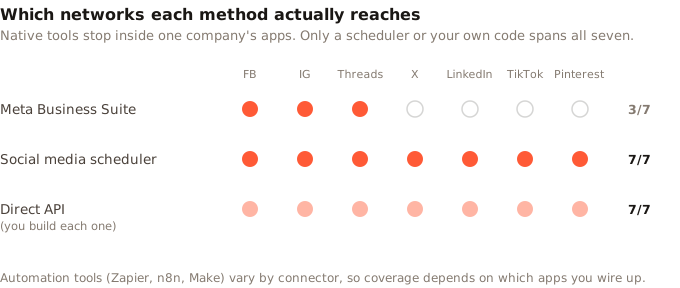
Two of these deserve a warning. Automation tools look cheap until you count tasks. Zapier bills per task, which it defines as each unit of work it completes successfully. You get 100 a month free, or 750 on the entry paid plan at $19.99 a month billed yearly (Zapier, 2026). Fan one post out to five networks and that's five tasks each time you post. A single daily post across five accounts burns roughly 150 tasks a month, so the free tier runs out before you have done anything else.
Direct API work is the opposite trade. It bends to any shape you want, and it costs the most to keep alive, because each network shifts its rules on its own clock and you own all seven.
Worth knowing: the "post everywhere at once" button is the easy part. The part that takes time is deciding what changes per network, and no tool decides that for you.
Why identical cross-posts underperform
Because the networks don't agree on anything. Caption limits alone span from 280 characters on X to 5,000 on Facebook, a roughly 18× spread, as documented in Buffer's Help Center (retrieved July 2026). A caption written to LinkedIn's 3,000-character ceiling doesn't get shortened on X. It gets refused or truncated.
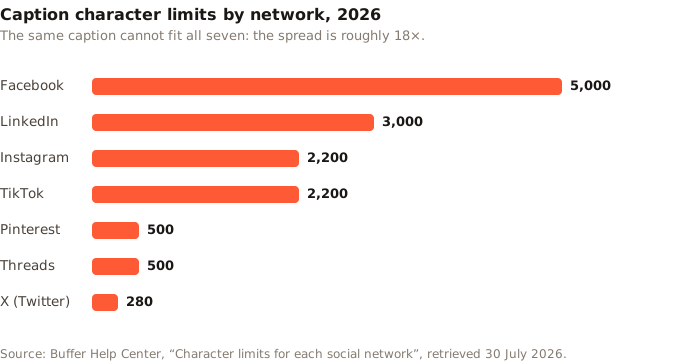
Limits are the measurable part of a broader mismatch. Three other things diverge, and each one quietly costs you:
- Links. Facebook and LinkedIn make in-post links clickable. Instagram doesn't, so a "read more at the link" caption lands dead there. That's what a link-in-bio page is for.
- Aspect ratio. As of July 2026, Instagram feed posts run 1080×1350 for vertical and 1080×1080 for square, while LinkedIn favours 1200×1200 and Pinterest wants a 2:3 ratio (Hootsuite, 2026). One asset cannot be native everywhere. Our social media image sizes cheat sheet has the current dimensions per network.
- Tone. Threads caps posts at 500 characters against LinkedIn's 3,000, and the formats that suit each tend to follow that gap. Treat this one as a working assumption to test against your own audience rather than a rule, but the same words rarely do both jobs well.
None of this means writing seven original posts. Write one, then make two or three small edits. A good scheduler should let you do exactly that without retyping anything.
How do you post to multiple social media accounts at once in Zilfu?
Link the accounts once and pick them as a group, then publish immediately or drop the post into a recurring weekly slot. Zilfu supports seven networks: Threads, Instagram, Facebook, TikTok, Pinterest, X, and LinkedIn. The queue checks for due posts once a minute, so scheduled posts go out on time rather than whenever a batch job wakes up.
Here's the setup end to end.
- Connect your accounts. Add each profile to one workspace. Connected accounts refresh their tokens daily, so you rarely reconnect them. If you manage separate brands or clients, give each one its own workspace rather than mixing them.
- Compose once, select many. Write the post and tick each account it should go to. Zilfu creates one post per account behind the scenes, which is what lets the next step work.
- Adjust per network before it ships. Because each account has its own post, you can trim the caption for X, swap "link in the post" for "link in bio" on Instagram, or change the image, without starting over.
- Pick a time, or let the queue pick. Use recurring weekly slots to define your cadence once (say Tuesday 9am, Wednesday 12pm, Thursday 9am), then send the post to the next open window. The Smart Queue shows your next nine open slots and skips any that are already filled.
- Route it for review if someone needs to sign off. Approvals are on every paid tier with unlimited reviewers, so a client or teammate can approve before anything publishes. Reviews are single-reviewer: one approval releases the post.
- Publish now when it can't wait. Publish Now bypasses the queue entirely.
After the first week you rarely touch setup again, and the daily job shrinks to: write, adjust, queue.
What about two accounts on the same network?
This is where pricing bites, and the models differ more than the marketing suggests. Buffer charges per channel, where a channel is one connected account, at $5 a month on Essentials and $10 on Team (Buffer, 2026). A second Instagram profile is one more line on the bill. Later bundles it differently: a Social Set is one profile of each type it supports. Extra sets cost $11.25 a month on Growth and Scale, and the Starter plan cannot add them at all (Later, 2026). Under that model, a second Instagram means buying a whole extra set, with seven profiles you may not want.
Zilfu counts each connected account against one flat plan cap instead, with no per-network multiplier and no per-seat fee for the people reviewing.
That matters most for agencies and multi-location businesses, where one post genuinely does need to reach six regional Instagram accounts. If that's your situation, the multiple accounts feature page covers the mechanics, and Zilfu for agencies covers the workspace-per-client structure.
One honest limitation: Zilfu does not import your posting history from another tool. Migrating means reconnecting accounts and scheduling forward, not carrying a back catalogue across. There is nothing to export and nothing to lose, but it is worth knowing before you switch.
How do you know it actually published?
Fanning one post out to six accounts creates six chances for a silent failure. A token expires, a network turns down a video for being out of spec, or an account drops its link. The post never goes out, and the dashboard still looks fine. This is the hardest failure to catch, because nothing flags it. You find out when a client asks why the campaign never ran.
Zilfu gives every post an explicit status: Draft, Pending approval, Scheduled, Processing, Published, or Error. A post that fails lands in Error with the reason attached rather than vanishing, and since each account has its own post row, a failure on Instagram does not take TikTok down with it.
Why we built it this way: early on, a single bundled record per send seemed simpler. It wasn't. One network turning down a video left the whole group in a murky state, with no clean way to retry just the account that failed. Splitting into one post per account made partial failure visible, which is why each publish, approval, and retry in Zilfu now happens per account rather than per batch.
Two habits make this a non-issue. Check the queue the morning after your first group send, and watch which accounts are still linked. A dead token is a common cause of a silent gap in a healthy plan, and it hides until you go looking.
Can you do it without opening a dashboard?
Yes, and this is the part most comparison posts skip. Zilfu ships a REST API and an MCP server on all plans, including Free. So posting to multiple accounts at once can be a script, a Zapier step, or one sentence typed to an AI helper you already use.
That last route is worth a caveat. Zilfu has no built-in AI writer. MCP connects an assistant you bring: Claude, ChatGPT, or anything else that speaks it. You grant it rights to draft and queue posts. The writing is your assistant's; the sending is Zilfu's. For teams that already run drafts through an assistant, this drops the dashboard from the loop.
Start with two accounts
The fastest way to learn whether posting to multiple social media accounts at once fits your workflow is to run it for a week. Zilfu's free plan covers 2 linked accounts and 15 posts a month. That is enough to connect two networks, configure three recurring slots, and test whether the compose-once-adjust-twice rhythm genuinely saves you time. No credit card, and the API and approvals are included at that tier rather than locked behind an upgrade.
What would you actually gain? Not the click itself, which takes seconds either way. The gain is that adapting one post for seven networks stops being seven separate jobs.
Sources
All sources retrieved 30 July 2026.
- Buffer. Character limits for each social network.
- Buffer. Pricing: per-channel plans.
- DataReportal. Digital 2026 Global Overview Report.
- Hootsuite. Social media image sizes for all networks.
- Later. Pricing: Social Sets and plan limits.
- Meta. Cross-posting to Facebook, Instagram and Threads.
- Meta. Crossposting to a Facebook Page with Instagram.
- Zapier. Pricing: tasks and plan limits.