— Scheduling

Scheduling that runs itself.

Set your posting rhythm once — days and times that repeat every week — then fill the next open slot with one click. Your posts go out on time, even while you sleep.

Free plan · No credit card required

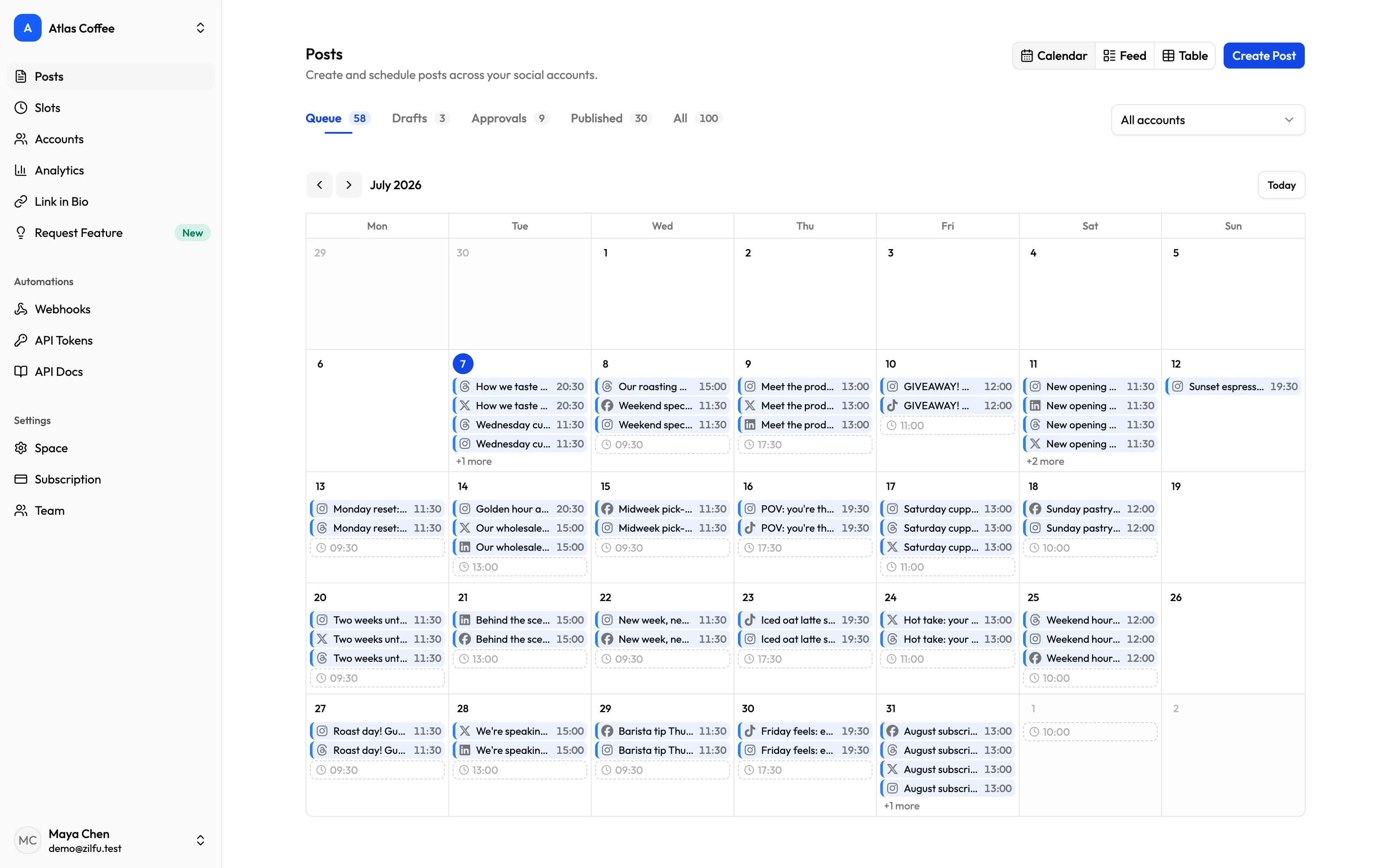
Zilfu calendar view showing a month of scheduled posts across accounts, with open recurring slots ready to fill
  • Recurring weekly slots
  • Smart Queue fills the next open window
  • Publishes while you're offline
  • Fill a whole week in one sitting
01 Rhythm

Set it once. It never asks again.

Pick days and a time — your slots repeat every week, and your only job left is the content.

Recurring weekly slots

Days plus a time, repeating every week from the moment you add them.

As many slots as you need

Morning, noon, and evening — a schedule as light or heavy as you like.

One-click changes

Rhythm changed? Remove a slot with a click and add the new one in seconds.

Your timezone, everywhere

Slots, queue, and calendar all run on your workspace timezone.

Gaps you can see

Open slots appear as markers on your posts calendar, so an empty day never sneaks by.

Next windows at a glance

The slots page lists your upcoming posting windows, dated and ready.

02 Fill

A week of posts, one sitting.

Write while the ideas flow, then drop each post into the next open window — no date pickers.

Smart Queue

Your next 9 open windows, ready to claim straight from the composer.

Skips what's taken

Slots with a post already in them are skipped automatically. No double-booking.

Exact date & time

A launch needs a precise moment? Break the rhythm with the date-time picker.

Publish Now

Skip the calendar entirely and push a post live immediately.

Drafts on the side

Park half-formed ideas — drafts never count against your queue or monthly limit.

Follow-up comment

Schedule a comment that posts itself after the post goes live — on Threads today.

03 Relax

Out on time, laptop closed.

Step away. Posts publish as scheduled, and your accounts stay connected on their own.

To the minute

Posts go out exactly when you chose, whether you're online or not.

Stays connected

Your accounts refresh themselves daily — no surprise logins, no dead queue.

Calendar, feed & table

Three views of what's planned and what went out. Your pick is remembered.

Seven networks

Threads, Instagram, Facebook, TikTok, Pinterest, X, and LinkedIn — one post covers them all.

One-click retry

If a network hiccups, the post flags itself and goes again with one click.

Approvals built in

Posts can wait for a client's yes — the slot fires only after approval.

— FAQ

Scheduling, asked and answered.

Yes. Define recurring weekly slots (days plus a time) once and they repeat every week; the Smart Queue then shows your next open windows to schedule into with one click.

It shows your next 9 open slots based on your recurring schedule, skipping any that already have a post, so you can schedule directly into the next free window from the composer.

Yes. Each workspace has its own timezone; recurring slots and queue times display in it, and you can change it anytime from the scheduling page.

All seven supported networks: Threads, Instagram, Facebook, TikTok, Pinterest, X, and LinkedIn. Compose once, pick accounts from a grid, and each network's own limits and settings are applied when you publish.

The post is marked with an error status so it stands out in the calendar, feed, and table views, and you can retry it with one click once the issue is resolved.

No. Zilfu refreshes your social connections automatically every day; if a re-authorization is ever needed, it's one click from the accounts page.

The Free plan includes 20 posts per calendar month — a multi-account post counts once, and drafts never count. All paid plans (Pro, Business, Scale) include unlimited posting.

Yes. Add a follow-up comment in the composer and pick the delay — presets from 5 minutes to 2 hours, or up to 7 days out. It posts automatically after your post goes live and is skipped if the post never publishes. Available on Threads today, with more networks to follow.

Set your rhythm once.

Define your slots, fill the queue, and take your evenings back — Zilfu handles the posting. Free to start, paid plans from $19/mo.