Social media automation tools handle four things: publishing on a schedule, fan-out to several accounts, analytics collection, and approval routing. Everything past that is a judgement call. In 2025 only 38% of B2B marketers automated social posting, against 89% for content creation (CMI, 2025). That leaves 62% posting by hand: the easiest task to automate is among the least automated.
Key takeaways
- Stories, replies, and per-network adaptation stay manual. What a tool can publish depends on each network's API.
- The pricing model matters more than the price: per-channel, per-set, and per-task billing each punish a different pattern of use.
- Keep one control that pauses everything. A queue publishing through a crisis costs more than it saves.
What do social media automation tools actually automate?
Four layers, in increasing order of how much they save you. Publishing is the base: the tool holds your post and sends it to the network through an official API, either on a one-off date or a recurring weekly slot. On top of that sit fan-out to several accounts at once, analytics collection, and approval routing. The CMI and MarketingProfs data puts social scheduling and posting fourth at 38%. Ahead of it sit content creation at 89%, creative assets at 53%, and SEO at 41% (CMI, 2025).
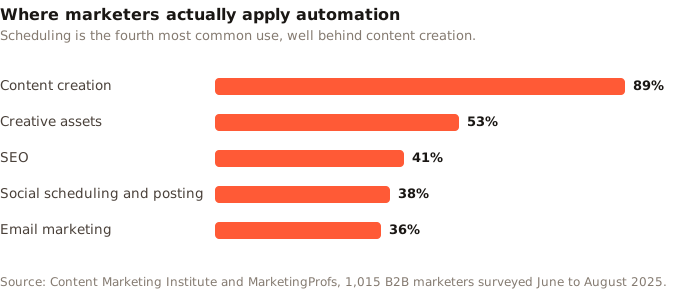
That ordering is worth sitting with. Marketers reach for AI to make the content and then publish it by hand, which is backwards in effort terms. Writing is the part that benefits from human judgement. Posting the same asset to seven accounts at the right local time is pure mechanics, and mechanics are what software is good at.
Where does automation stop working?
At the point where a decision is needed. Automation software can queue a post for Thursday at 9am; it cannot tell you whether Thursday at 9am is right for your audience, or whether today is a day to stay quiet. That line runs through every feature list, and the honest tools are clear about which side they sit on.
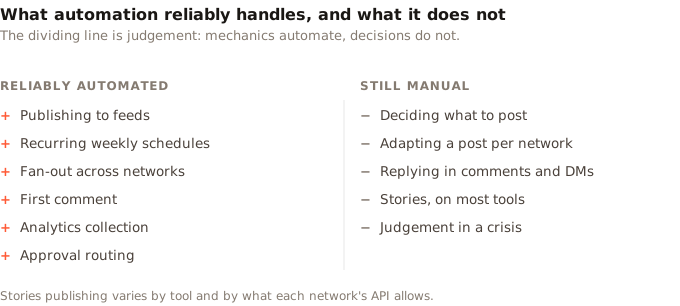
Three limits catch people out. Stories are only partially supported: what a tool can publish depends on what each network's API allows, and it changes. Replies and DMs can be automated, and almost always should not be, because an automated reply reads as one. Per-network adaptation is the big one. Caption limits run from 280 characters on X to 5,000 on Facebook (Buffer, 2026). One caption cannot fit everywhere, and no tool decides which words to cut. Our social media image sizes sheet covers the same problem for assets.
Worth knowing: the strongest argument for automation is not speed. It is consistency. A queue posts on the week you are ill, travelling, or busy with a launch, which is exactly when manual posting stops.
What is social media automation software, versus a scheduler?
The labels are marketing, not architecture. A scheduler publishes what you queue. Social media automation software adds rules that run without you. Slots refill themselves. Approvals route to a reviewer. Webhooks tell another system a post went live, and an API lets a script do the queuing. Almost every product sold as a social media automation platform is a scheduler with some of those layered on top.
So the useful question is not which category a tool claims. It is which of those rules you will actually use. A solo creator posting three times a week needs scheduling and nothing more. An agency running twelve client accounts needs approvals and per-client separation. That is the point where the extra machinery earns its price, and it is why Zilfu for agencies is built around a workspace per client.
Your audience makes this unavoidable. Online adults now use an average of 6.75 social platforms a month (DataReportal, 2026), so a serious presence means several networks, which means either several tabs or one tool.
How do you choose the best social media automation tools?
Judge the pricing model before the feature list, because that is what changes the bill as you grow. Four models are common, and each punishes a different pattern of use.
| Model | How it charges | Punishes |
|---|---|---|
| Per channel | Each connected account | Running many accounts |
| Per social set | Bundles of one profile per network | Wanting two of the same network |
| Per task | Each publish action | Posting often |
| Flat cap | A plan ceiling on accounts | Nothing, until you hit the cap |
Real numbers make the difference concrete. Buffer charges per channel at $5 a month on Essentials and $10 on Team (Buffer, 2026). Later sells Social Sets, one profile of each supported type, with extra sets at $11.25 a month and no option to add them on Starter (Later, 2026). Zapier bills per task, giving 100 a month free and 750 at $19.99 billed yearly (Zapier, 2026). A daily post across five networks burns roughly 150 tasks a month on its own.
Beyond price, four things separate the best social media automation tools from the rest:
- Failure is visible. A post that fails should say so with a reason, not vanish while the dashboard looks healthy.
- Per-network editing. You should be able to trim a caption for X without retyping the whole post.
- A real API. If automation is the goal, the tool should be drivable from outside its own interface.
- A pause control. One switch that stops everything, tested before you need it.
How does social media posting automation work in Zilfu?
You define the cadence once and drop posts into it. Zilfu supports seven networks: Threads, Instagram, Facebook, TikTok, Pinterest, X, and LinkedIn. Running several profiles on one network costs nothing extra, which the multiple accounts page covers. Recurring weekly slots hold your schedule. The Smart Queue shows the next nine open windows and skips any already filled. The queue checks for due posts once a minute, so publishing lands on time. Each network adds its own rules on top: automating Instagram posting covers the ones Meta documents, including a JPEG-only restriction that stops most generated images.
The setup runs in four steps.
- Connect the accounts. Tokens refresh daily, so you rarely reconnect. Each brand or client gets its own workspace rather than sharing one.
- Define recurring slots. Pick days and times once, for example Tuesday 9am, Wednesday 12pm, Thursday 9am. Those repeat until you change them.
- Queue the post. Select every account it should reach and send it to the next open slot. Zilfu creates one post per account, which is what lets you adjust each one separately.
- Route for approval if needed. Every paid tier includes unlimited reviewers. Reviews are single-reviewer, so one approval releases the post.
Every post carries an explicit status: Draft, Pending approval, Scheduled, Processing, Published, or Error. A failure lands in Error with its reason rather than disappearing, and because each account has its own post, one network rejecting a video does not stop the others.
For automation that runs without the interface, Zilfu ships a REST API and an MCP server on every plan including Free. That covers scripts, Zapier or n8n, and AI assistants, as the automation and agents page sets out. One caveat worth stating plainly: Zilfu has no built-in AI writer. MCP connects an assistant you already use, so the drafting is yours and the publishing is Zilfu's.
What should you not automate?
Anything where being wrong is expensive. The queue does not know your product just broke, or that a story is unfolding that makes your scheduled joke land badly. This is the failure mode that turns a time-saving tool into a liability, and it is entirely preventable.
Two habits cover it. Keep a single control that pauses everything, and confirm it works before you need it, because pausing twelve accounts one post at a time during a live incident is not a plan. Then check the queue the morning after any large batch, since a dead token produces silence rather than an error you would notice.
Automated replies deserve their own warning. They are technically easy and almost always a mistake, because the gap between an automated reply and a real one is obvious to the person receiving it. Automate the publishing. Answer people yourself.
Start with posting automation
The fastest way to judge whether social media automation tools fit your workflow is to automate one thing and watch it for a fortnight. Set three recurring slots, queue two weeks of posts, and see whether the cadence holds without you. That single change delivers most of the benefit, and it needs no new skills.
Zilfu's free plan covers one owner, 2 connected accounts, and 15 posts a month, with the API included rather than locked behind an upgrade. Collaborative approvals and team invitations start on Pro. If it works, the next steps are adding accounts and moving the queuing into a script. If it does not, you have lost a fortnight and no money.
Sources
All sources retrieved 30 July 2026.
- Buffer. Character limits for each social network.
- Buffer. Pricing: per-channel plans.
- Content Marketing Institute. B2B content marketing trends, 2026 research.
- DataReportal. Digital 2026 Global Overview Report.
- Later. Pricing: Social Sets and plan limits.
- Zapier. Pricing: tasks and plan limits.