Automating Instagram posting means handing a post to Meta's Content Publishing API and letting something else fire the publish call at the right minute. The word missing from that sentence is scheduling. Meta's API has no scheduling endpoint and no publish-time parameter, so every scheduler on the market is a queue sitting in front of an immediate publish. Most of what goes wrong afterwards comes from six documented restrictions, and the sharpest of them is a format rule no composer warns you about.
Key takeaways
- JPEG only. No other image format publishes.
- No scheduling endpoint exists. Your tool holds the post and fires an immediate publish at the minute you picked.
- Since June 2026 you can self-disclose AI content by setting
is_ai_generatedon the container.
Can you automate Instagram posting?
Yes. Four routes do it, and picking between them is really a question of who holds the post while it waits. Meta issues no credential to a browser extension or a chatbot, so anything publishing on your behalf has been through an app registration and an OAuth grant first, whether or not you watched it happen.
- Meta's in-app scheduling. Free, limited to accounts you personally administer.
- A third-party scheduler. You upload, it queues, it publishes. Anything sold as an Instagram auto poster is this route wearing a shorter name.
- A no-code workflow. Make, Zapier or n8n calling a scheduler's API on a trigger, such as a new row in a sheet.
- Your own code, or an AI assistant. A script, a cron job, or an assistant connected over MCP.
Routes three and four are the underserved ones. Both appear in Google's related searches for this query while the pages ranking for them mostly describe route two.
Whichever you pick, the setup is the same five steps:
- Switch the account to professional. Business or Creator both work. This is free, takes a minute, and personal accounts cannot publish through the API at all.
- Connect it to your tool. An OAuth grant, not a password. You will be asked for publishing permission by name.
- Get the media to a URL. The API fetches media rather than accepting an upload, so the file has to be reachable. JPEG for images.
- Define the cadence, then queue against it. Recurring weekly slots beat picking times by hand every week.
- Confirm the first publish actually landed. Open Instagram and check it rendered the way you expected, because a single video will have become a Reel. This is the step everyone skips, and it is the only one that catches a permission the OAuth screen quietly did not grant, which is exactly how accounts connected before 28 July 2026 ended up without first comments.
Worth knowing: Zilfu is one of the schedulers described here, so treat this as an argument rather than a verdict. Instead of asking for trust, this page quotes Meta's own documentation and states exactly what our publisher sends.
The API has no scheduling endpoint
This is the mechanism nobody explains, and it changes how you read every feature list. Meta's Content Publishing API takes a media container and publishes it now. Search its guide for the word schedule and exactly one sentence comes back, addressed to developers rather than to you:
"We recommend that your app also enforce the publishing rate limit, especially if your app allows app users to schedule posts to be published in the future." (Meta)
Meta is telling tool builders to police themselves. That is an odd thing to write on a page for a feature that does not exist, and it is the clearest signal anywhere in the documentation that scheduling lives entirely outside Meta.
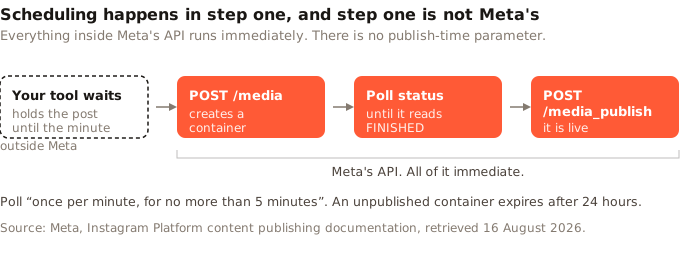
Three consequences follow. Publishing can fail after you have stopped looking, because the call happens without you. Your tool's uptime becomes part of your posting reliability, since a queue that is down at 9am does not publish at 9am. And no tool can be bound by a native scheduling window, because Meta is not holding the post and does not know it exists until it arrives. The same absence shapes the credential side of the setup, which Instagram API access covers in full.
What can actually be published automatically?
Four things: an image, a carousel, a Reel, a Story. All of them travel a two-step flow. You create a media container, Instagram processes it, and a second call publishes that container. Containers do not last: Meta defines the EXPIRED status as "The container was not published within 24 hours and has expired."
media_type accepts CAROUSEL, REELS and STORIES; omit it and you get a single image. There is no value for a standalone feed video, which is the whole reason a single video becomes a Reel. Stories can therefore be automated through the API, which surprises people, though plenty of tools never expose it. Carousels are "limited to 10 images, videos, or a mix of the two" (Meta).
The restrictions are where automation gets hurt, and Meta documents all of them:
| What is restricted | What Meta documents |
|---|---|
| Image format | "JPEG is the only image format supported." |
| Filters | "Filters are not supported." |
| Carousel cropping | "Carousel images are all cropped based on the first image in the carousel, with the default being a 1:1 aspect ratio." |
| Captions on carousel items | "Not supported on images or videos in carousels." |
| Alt text (not on Reels or Stories) | "For image posts only." |
| Caption size | 2,200 characters, 30 hashtags, 20 @ tags |
Sit with the JPEG line. Image generators emit PNG or WebP by default, so a pipeline that produces images and pushes them straight at Instagram fails at the first upload, with an error pointing at the file rather than at the format. It is the most common reason an otherwise correct automation never posts anything.
Our finding: here is what our own publisher does, including the part that does not flatter us. Fact-checking this article against our code found the exact trap the paragraph above describes, sitting in it. Zilfu accepts JPEG, PNG and WebP on upload and keeps the original untouched, and until we found this, an image was only rewritten when it was over the network's size spec — for Instagram, 8 MB or 1,440 pixels wide. A 1024 by 1024 PNG out of an image generator is under both, so it went to Meta as a PNG and Meta refused it. Format is now settled per network on the way out: Instagram documents JPEG and nothing else, so anything else is re-encoded for it, and Threads, which documents JPEG and PNG, gets the same treatment for WebP. Two things worth taking from that whoever your tool is. The conversion has to key on what the network accepts, not on how big the file is. And JPEG has no transparency, so a PNG with an alpha channel lands on white — fine for a photo, worth checking for a logo.
The rest of what we send is more reassuring. For one media item we set media_type to IMAGE for a photo and REELS for a video. For several we create one child container per item, poll each until ready, then create a CAROUSEL container listing the children. A post with no media never reaches Meta at all: it fails in our own code with "Instagram requires at least one photo or video."
That REELS value deserves naming, because no interface warns you about it. Instagram retired standalone feed video into Reels and the publishing API followed. Automate a single video and it publishes as a Reel, whatever your tool calls it. Video inside a carousel behaves differently again, as a carousel child rather than a Reel.
Should you label an automated post as AI-generated?
Yes, if the image was generated, and Meta made that possible in June 2026. Almost nothing written about Instagram automation mentions it. From the changelog: "The Content Publishing API now supports self-disclosure of AI-generated content at publish time." The mechanism is one parameter. "Set the new is_ai_generated parameter to true when creating a media container to apply the AI info label" (Meta).
Two properties matter if you run generated content at volume. Disclosure is set by whoever builds the container, so it is a choice your tool makes on your behalf rather than something Meta enforces. And Meta notes it is "not available for carousel children", meaning a carousel carries the label whole or not at all.
Our own position, stated plainly: Zilfu does not currently set is_ai_generated. Our Instagram publisher sends media type, caption and children, nothing more. If disclosure matters to you today, that is a gap on our side rather than Meta's.
Does automating Instagram posts risk the account?
Less than the forum threads suggest, provided you know which kind of automation you bought. Publishing through the Content Publishing API is the sanctioned path. It runs on a registered app, an explicit OAuth grant, and permissions Meta reviews before you can serve accounts you do not own, since "Your app must complete App Review before it can request permissions with Advanced Access from any app user" (Meta).
The tools that carry real risk work differently. They drive the Instagram interface as though a person were tapping it, or they send unsolicited DMs and follows. That is a different mechanism from an API call against a token you granted, and it is the mechanism the cautionary stories are usually about.
The risk that is real sits somewhere else entirely, and it is not your account. It is your tool's Meta app. If that gets restricted, every account connected through it stops publishing at once, for a reason you cannot see, diagnose or fix from your side. That is the genuine tail risk of handing your posting to somebody else, ours included, and it is worth more of your attention than the shadowban stories.
One honest gap. We searched Meta's Instagram Platform documentation, its changelog and its Transparency Center, and found no statement about reach or ranking consequences for API publishing in either direction. Competing pages on this topic promise no shadowban with no source attached. Treat confident claims in both directions with suspicion, including that one.
The daily cap, and the endpoint that reports yours
The cap is far more than you will use, and its shape matters more than its size. Meta documents the cap four times across three pages: 50 three times, 100 once, with carousels counting as a single post throughout. Our social media scheduling API piece works through that contradiction and which tools enforce which number.
Skip the argument. GET /{ig-user-id}/content_publishing_limit returns your live usage against your live quota, with quota_duration documented as "currently 86400 seconds, or 24 hours" (Meta). That endpoint is the only number true for your account right now, and nobody writing about this quotes it.
Now compare either figure against real behaviour. Socialinsider counted a median of 8 Reels, 7 images and 5 carousels a month across 35 million posts from 447,613 pages, so on the order of 20 posts a month, though per-format medians do not strictly add (Socialinsider, updated February 2026). That page carries a caveat worth repeating: the values are 2025 data presented under a 2026 heading, because the year had barely started at publication. Even read loosely, 20 a month against a floor of 50 a day means the cap never binds on volume.
What it does instead is set a shape. The limit is stated per Instagram account, so it neither pools nor transfers. Ten accounts do not share fifty posts; they hold fifty each. Meta is indifferent to how hard you push one account and entirely permissive about how many you add. That moves the real constraint onto your scheduler's pricing model, because per-channel billing charges for exactly the thing Meta gives away.
Do you need a Facebook Page?
No. This is the most repeated error on the topic, and it survives because it used to be true. Meta's page for Instagram API with Instagram Login states: "This API setup does not require a Facebook Page to be linked to the Instagram professional account" (Meta). The older Facebook Login setup still requires one, and both remain current.
That route trades something away, in Meta's words: "This API setup cannot access ads or tagging." For the full picture on the two setups, the token exchange and what App Review gates, see Instagram API access.
Can ChatGPT automate Instagram posts?
An assistant holds no Instagram credential, so no. Meta issues credentials to registered apps rather than to chat interfaces, which is why asking a general-purpose assistant to post gets you a description of how you might.
Giving the assistant tools is what works. MCP is the protocol for it: the assistant calls a tool, the tool belongs to a scheduler already holding your token, and the scheduler publishes. Drafting stays with the assistant; the credential and the publish stay where they were.
Zilfu's MCP server sits on the Free tier as well as the paid ones, so an assistant can list your accounts, request an upload and queue a post without an interface ever opening. No writing model of ours enters that loop. You bring the assistant you already use, which the automation and agents page describes in full.
Native scheduling or a tool?
Instagram's in-app scheduler covers a real slice of this. Reporting from its rollout puts it at professional accounts only, up to 75 days ahead, for posts, Reels and carousels (TechCrunch, November 2022). Meta's own help pages would not open for us, so treat those numbers as dated reporting rather than current documentation and check in the app before planning around 75 days.
| What you are comparing | Native in-app | Scheduler | No-code workflow | Your own code |
|---|---|---|---|---|
| Cost | free | free tier upward | scheduler plus task fees | scheduler only |
| Several accounts at once | no | yes | yes | yes |
| Content source | you, by hand | you, by hand | a sheet, feed or database | anything |
| Holds the post | Meta | the tool | the tool | the tool |
| Fails visibly | notification only | depends on the tool | depends on both | your logs |
Task fees are the trap in the no-code column. Zapier's free tier stops at 100 tasks a month, and 750 costs $19.99 billed yearly (Zapier, 2026). Post once a day to five accounts and you spend roughly 150, so the free allowance runs out around the twenty-first. From there you pay Zapier on top of the scheduler that was always going to hold the post. Route three bills twice for one job. It only turns genuinely expensive past 750 tasks, or 25 posts a day.
Failure visibility is the row people discover last. A queue gone quiet because a token expired looks identical to a queue with nothing due, and the difference costs you two weeks before anyone notices.
What automation buys is recency
Recency, which is what consistency now converts into. On its Q2 2026 earnings call the CFO said that on Instagram Feed, "over half of all recommended content is now less than one day old, more than double from a year ago" (Meta, July 2026). A quarter earlier the same executive put same-day posts above 30% of recommended Reels, also more than double year on year (Meta, April 2026).
Read that as a ranking system increasingly rewarding presence today over quality last month. A queue posts during the week you are ill, travelling, or shipping something, which is precisely when manual posting stops.
Format matters alongside cadence, and the evidence cuts against the convenient choice. Metricool found Reels drawing more than four times the interactions of single-image posts and carousels nine times more saves, across 24.4 million posts from 375,118 accounts (Metricool, June 2026). Single images moved the other way on every measure.
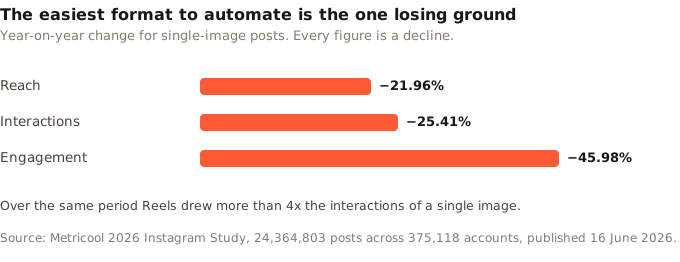
A still image is the cheapest thing to generate and the cheapest thing to queue. That is exactly why automated accounts drift toward it. Automate one format and the numbers point away from the one your pipeline picks by default.
Where Zilfu fits, and where it does not
Zilfu publishes Instagram feed images, carousels and Reels from one queue, on a dispatcher checking for due posts once a minute. Recurring weekly slots hold the cadence, and running multiple Instagram accounts costs nothing extra, which starts to matter once you notice the daily cap is counted per account. The same behaviour is reachable three ways: the REST API takes a scheduled post directly, the MCP server exposes the same operations to an assistant, and the CLI does it in one line.
zilfu posts create --space 1 --account 12 --account 13 \
  --media https://cdn.example.com/launch.jpg \
  --text "Ship day." --at 2026-08-14T18:00:00Z
Five honest limits. The first two are Instagram-specific; the rest apply everywhere.
- No AI label, since we do not yet send
is_ai_generated. - First comments need a reconnect if your Instagram account was connected before 28 July 2026, because the permission carrying them was approved on that date and older connections lack it.
- No Stories, on Instagram or any other network, although Meta's API supports them.
- No AI writer, so the content is yours to bring.
- Minute resolution, not second, because the dispatcher runs on a one-minute tick and Instagram's processing adds its own delay once the container is with Meta.
For the broader question of what belongs on a queue at all, and what should stay manual on every network, see social media automation tools.
If you are testing this, test the format first. Push one generated image through your whole pipeline before you build anything on top of it, because a wrong file extension fails identically to a broken integration and costs a day to tell apart. Once an image lands, cadence is the next constraint to measure. Zilfu's free plan covers 2 accounts and 15 posts a month, enough for a controlled end-to-end test; publishing around the roughly 20-post cadence implied by Socialinsider's medians requires a paid plan.
Sources
All sources retrieved 16 August 2026. Meta does not date-stamp its Instagram Platform documentation pages.
- Meta. Instagram Platform, content publishing guide. https://developers.facebook.com/docs/instagram-platform/content-publishing
- Meta. IG User
mediareference, container parameters. https://developers.facebook.com/docs/instagram-platform/instagram-graph-api/reference/ig-user/media/ - Meta. IG User
media_publishreference. https://developers.facebook.com/docs/instagram-platform/instagram-graph-api/reference/ig-user/media_publish/ - Meta. IG User
content_publishing_limitreference. https://developers.facebook.com/docs/instagram-api/reference/ig-user/content_publishing_limit/ - Meta. Instagram Platform overview, account and setup requirements. https://developers.facebook.com/docs/instagram-platform/overview
- Meta. Instagram API with Instagram Login. https://developers.facebook.com/docs/instagram-platform/instagram-api-with-instagram-login/
- Meta. App Review for Instagram. https://developers.facebook.com/docs/instagram-platform/app-review/
- Meta. Instagram Platform changelog, entry dated 22 June 2026. https://developers.facebook.com/docs/instagram-platform/changelog
- Meta. Second Quarter 2026 Results Conference Call transcript, 29 July 2026. https://s21.q4cdn.com/399680738/files/doc_financials/2026/q2/META-Q2-2026-Earnings-Call-Transcript.pdf
- Meta. First Quarter 2026 Results Conference Call transcript, 29 April 2026. https://s21.q4cdn.com/399680738/files/doc_financials/2026/q1/META-Q1-2026-Earnings-Call-Transcript.pdf
- Metricool. 2026 Instagram Study, 24,364,803 posts across 375,118 accounts, published 16 June 2026. https://metricool.com/press-release-instagram-study-2026/
- Socialinsider. 2026 Instagram Organic Engagement Benchmarks, 35M posts across 447,613 pages, updated 20 February 2026. https://www.socialinsider.io/social-media-benchmarks/instagram
- TechCrunch. Instagram brings its scheduling tool to all professional accounts, 8 November 2022. https://techcrunch.com/2022/11/08/instagram-scheduling-tool-all-professional-accounts/
- Zapier. Pricing: tasks and plan limits. https://zapier.com/pricing