The Instagram API is free to call, and there is no Instagram API key to buy. What stands between you and a working integration is an account type, an App Review, and a token that dies quietly at 60 days. A fourth requirement disappeared two years ago, which is where this gets interesting.
Key takeaways
- Meta dropped the linked Facebook Page requirement on 23 July 2024.
- Three ranking guides never mention the setup that replaced it. One was revised in August 2026.
- Standard Access only reaches people who hold a role on your app.
- Basic Display returned errors from 4 December 2024, and nothing replaced it.
Is there an Instagram API key?
No, and the gap between what people search for and what exists is the source of a lot of wasted afternoons. There is no string Instagram hands you that grants access. Register an app and you get an App ID and an App Secret. Those two are the start of a flow, not the end of one.
Three steps, and three things come out of them. You send the user to an authorization URL, they approve, and Meta redirects to your URI with an authorization code, valid for one hour and usable once. You trade that code for a short-lived token. Then you trade the short-lived token for a long-lived one. Only the third behaves like the "key" people came looking for, and unlike a key it expires.
That matters for anyone weighing build against buy. The credential is per user, not per developer. Every Instagram account you publish to runs its own OAuth flow and gets its own token on its own clock. Our API quickstart shows the other shape, where the tokens belong to the scheduler and you hold one of ours.
Do you need a Facebook Page to use the Instagram API?
Not on the current setup. This is the stale fact we found most often while researching this piece.
Meta now documents two configurations. The page for the newer one, Instagram API with Instagram Login, states it plainly: "This API setup does not require a Facebook Page to be linked to the Instagram professional account." (Meta). The changelog entry that introduced it, dated 23 July 2024, put it prospectively: "A Facebook Page will no longer be required." (Meta). The other configuration, Instagram API with Facebook Login for Business, does still require a linked Page. Meta's overview table prints the difference as a single row.
Both setups need the Instagram account to be professional, meaning Business or Creator. That requirement did not go away. It is also not the same requirement as the Page, and conflating the two is where the confusion starts.
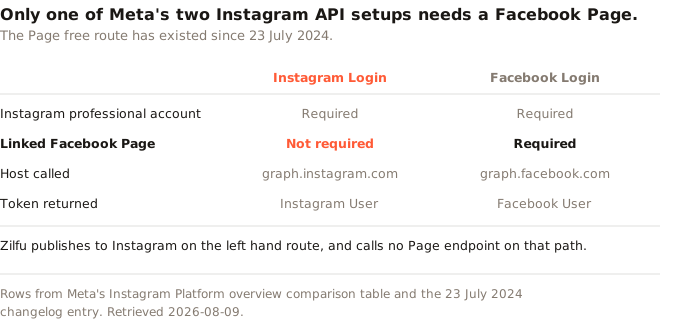
| Setup | Professional account | Linked Facebook Page | Host | Token returned |
|---|---|---|---|---|
| Instagram API with Instagram Login | Required | Not required | graph.instagram.com |
Instagram User |
| Instagram API with Facebook Login for Business | Required | Required | graph.facebook.com |
Facebook User |
Is the Instagram Graph API the same thing?
The Instagram Graph API is the older name for the Page-linked row in that table, the one calling graph.facebook.com. It is not an umbrella over both. All three guides we read still use the old name, which is part of why the belief persists. Meta dropped the requirement itself in July 2024.
What our own integration does
We can be specific here, because this is what our own code does. Zilfu sends users to instagram.com/oauth/authorize and exchanges at api.instagram.com/oauth/access_token. After that it calls graph.instagram.com for everything: creating a media container, publishing it, reading the permalink back, posting the first comment. There is no /me/accounts call in that path, no instagram_business_account lookup, and no Page ID stored against an Instagram account. Our Facebook integration does call /me/accounts, because Pages genuinely work that way. The two sit in separate drivers because they are separate models.
Worth knowing: Zilfu sells a scheduler and holds an approved Meta app, so the build-it-yourself cost on this page is not a neutral estimate. What we can do instead of asking for trust is quote Meta's own documentation and show the string matches we ran against each third-party guide, which is what the rest of this page does.
Three ranking guides, and what they actually say
That is a claim about other people's pages, so we counted rather than characterised. We fetched the third-party guides ranking for this term as raw HTML and searched the delivered markup by string.
Across all three, the phrases "Instagram Login", "Business Login", graph.instagram.com and any instagram_business_* scope name appear zero times. Not once, on any of them. The configuration Meta shipped in July 2024 is absent from every guide we could read that ranks for the term describing it.
Two of the three go further and state the old rule as current:
- Taggbox, in a guide whose JSON-LD carries
dateModifiedof 1 June 2026: "if you want to fetch content from an Instagram Business Account, then you must create a Facebook Page and link that page with your Instagram Business Account." (Taggbox). - Phyllo, on a page titled "Updated for 2026" whose
dateModifiedreads 6 August 2026, three days before this article: an FAQ entry asking "Do I need a Facebook Page to use the Instagram Graph API?" and answering "Yes, in most cases." The body goes further: "The account has to be Instagram Business or Creator and linked to a Facebook Page, or publishing, comment moderation, and insights endpoints stay closed." (Phyllo).
Publishing and comment moderation are the two things Zilfu does routinely on accounts with no Page attached, on scopes named instagram_business_content_publish and instagram_business_manage_comments. The endpoints are not closed. They are on the other host.
None of this requires anyone to have been careless. It is what happens when a platform ships a second setup and keeps the first one alive. The old advice stays true for the old route, so nothing visibly breaks. A page can then be revised many times over without the stale paragraph ever being the one that gets read. The check that catches it is simple: read the branch of the documentation named after your login method, not the one named after the feature you want.
What happened to the Instagram Basic Display API?
It was switched off. The changelog entry dated 4 December 2024 is two sentences: "The Instagram Basic Display API has been deprecated. All requests to the Instagram Basic Display API will return an error message." (Meta).
If you arrived here wanting to put your own Instagram photos on your own website, this is the answer and it is not a good one. Basic Display was the only route that read a personal account, and nothing replaced that. The two current setups both require a professional account. Converting to a Creator account is free and reversible, and for a personal site that is usually the shortest path. If you would rather not, an embed widget from one of the feed vendors does the same conversion behind the scenes, on an account that is not yours. The pricing follows from that.
This is also why so much of the current advice reads oddly. Two of the three guides we read are published by companies selling embed widgets, and the embed use case is the one Basic Display served.
How much does the Instagram API cost?
Meta charges nothing per call. There is no Instagram API pricing page, because there is no price: no plan, no meter, no invoice. That is what makes the question so persistent, because people search it, find no number, and assume they missed a page.
The cost is denominated in review, not dollars. Meta operates two access levels, and the difference decides whether you have a product or a demo:
- Standard Access. "Permissions with Standard Access can only be requested from app users who have a role on the requesting app." So it works for you and for anyone you add to the app as a developer or tester. It works for no customer.
- Advanced Access. "Permissions with Advanced Access can be requested from any app user, and features with Advanced Access are active for all app users."
Getting from one to the other has a hard prerequisite: "Business Verification is required to get Advanced Access." Meta adds that "In some cases additional App Review on an individual permission and feature basis might be required." (Meta). For the publishing and comment scopes, plan on App Review being part of it.
So the honest answer is that the Instagram API costs nothing per request. What it costs instead is a business entity you can verify, a review whose timing you do not control, and time spent building a demo of a product that cannot yet have users. That last item is the one most likely to be missing from the estimate. It is also why the build-versus-buy sum so often lands on posting through something that already holds an approved app. Our API and MCP surface is on the free plan for that reason.
Rate limits are the other number people expect to find here. Meta publishes two different daily publishing caps for Instagram on a single documentation page, and we take that contradiction apart in our social media API comparison rather than repeat it.
How long does an Instagram access token last?
Sixty days, and the way it ends is the interesting part.
A long-lived Instagram User access token is valid for 60 days. You refresh it by calling refresh_access_token with grant_type set to ig_refresh_token, and the token has to be at least 24 hours old before that call will work. So the window in which a refresh is possible opens on day one and closes on day sixty.
Then this, from Meta's Business Login documentation: "Tokens that have not been refreshed in 60 days will expire and can no longer be refreshed." (Meta).
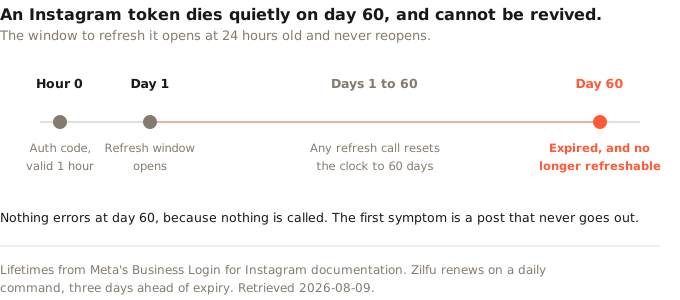
There is no grace period and no error to catch, because nothing announces itself at day 60. No request fails, because no request is made. The integration simply stops being able to act, and you find out when someone asks why the posts stopped. A dead token cannot be refreshed, only replaced, which means every affected user has to walk through the OAuth flow again.
If you are building this yourself, the refresh job is not the optional polish item it looks like during the first week. Zilfu runs its token refresh on a daily schedule and renews anything inside three days of expiry. A token enters that window on day 57, so it gets three attempts before day 60. The scheduler would have to miss all three for an account to reach real risk. That margin is the feature. Build it early, because the alternative fails without telling anyone.
Why can't I schedule posts on Instagram?
Two different questions share this wording, and they have different answers.
If you are in the Instagram app and there is no scheduling option, the account is almost certainly personal rather than professional. Scheduling is a professional account feature. Worth stating plainly, because the usual answer to this question drifts into the Facebook Page confusion above. You are not missing a Page. You are missing an account type, and switching is free and takes about a minute in settings.
If you mean the API, the answer is structural. Instagram's content publishing endpoints accept no future timestamp. You create a media container and you publish it, and both happen now. There is no scheduled_publish_time here the way there is on Facebook Pages. So any tool that appears to schedule Instagram posts is holding your post in its own queue and calling the publish endpoint at the minute you picked. That is a real feature. It is also why the queue is the product rather than the API. Our Instagram scheduling page covers what publishes through that path, and automating Instagram posting works through the four routes that queue sits behind.
What breaks after you ship
Three things that bite after launch, in the order you meet them.
Publishing is two calls, and the gap between them is where failures live. You POST to /media to create a container, poll it until Meta reports it ready, then POST to /media_publish. Meta suggests querying "a container's status once per minute, for no more than 5 minutes". Leave a container unpublished and it goes EXPIRED, which Meta defines as "was not published within 24 hours and has expired." (Meta).
A container can stop responding without ever failing. Meta documents five status codes: IN_PROGRESS while it works, then FINISHED, PUBLISHED, ERROR or EXPIRED. What we hit in production was a video that sat in IN_PROGRESS and reached none of the other four. The file was outside Instagram's specification, and Meta's transcoder does not always report that as an error. A 3180 by 2160 screen recording did it.
The fix was not better polling. It was refusing the upload earlier. Zilfu checks video width at ingest and rejects anything wider than 1920 pixels, which is the widest we have seen Instagram transcode reliably. A poll timeout is a backstop. The real defence is catching the file before the post is ever scheduled.
Checking what an existing token may do is harder than it should be. Instagram reports its granted permissions once, in the token exchange. Facebook exposes /me/permissions for asking later. We found no documented equivalent on graph.instagram.com, and our integration assumes there is none.
So the only way to learn whether a token still holds a scope is to make a call that needs it and read the refusal. Our own scope check works that way, and it runs in one direction only. A successful probe proves one scope and is recorded as proving nothing else. Treating a partial result as complete would mark every unprobed scope denied, which is the more damaging mistake. Add a scope later and existing users keep tokens that predate it. Nothing in the API will volunteer that.
Where the Instagram API documentation actually lives
At developers.facebook.com/docs/instagram-platform, and the navigation is the part worth understanding, because it is organised by login method rather than by feature.
Choose your branch first. If your users have Instagram and no Facebook presence, you want Instagram API with Instagram Login, host graph.instagram.com, scopes prefixed instagram_business_. If your users are businesses already running Facebook Pages and you need the Page relationship anyway, you want Instagram API with Facebook Login for Business, host graph.facebook.com. The pages below those two headings state account requirements, scope names and host URLs that apply to that branch and not the other.
That is a plausible route to the stale claim this article opened with. Read a page from one branch while building on the other, and the requirements list looks authoritative and is wrong. A deep link from search can drop you inside either branch without saying which. The host URL in the code samples is the tell.
The shorter route
If your goal is publishing rather than owning an integration, none of the above is work you have to do. Connect an Instagram account to a scheduler that already holds an approved Meta app, and the App Review, the business verification and the refresh job come with it.
Zilfu's free plan covers 2 accounts and 15 posts a month, with the REST API, webhooks and MCP included. No card, no time limit. That is enough to publish through graph.instagram.com without registering an app at all.
And if you do build your own, keep the token section. The rest of this page is a morning of reading documentation and you will get through it. The token clock is different. It is the failure that finds you months later, once the customers are real.
Sources
Meta's documentation was retrieved on 9 August 2026. The third-party guides were fetched as raw HTML on the same date and searched by string match against the delivered markup rather than summarised, and their dates come from the JSON-LD embedded in each page. A fourth candidate page was excluded because the URL returned a 404.
- Meta. Instagram Platform overview, including the setup comparison table.
- Meta. Instagram API with Instagram Login.
- Meta. Instagram Platform changelog, entries dated 23 July 2024 and 4 December 2024.
- Meta. Business Login for Instagram, token lifetimes and refresh.
- Meta. Instagram content publishing, container status codes and polling guidance.
- Meta. Graph API access levels, Standard and Advanced Access.
- Taggbox. Instagram API: A Guide for Developers & Marketers,
dateModified2026-06-01. - Tagembed. Instagram API: A Complete Guide For Businesses In 2026,
dateModified2025-09-05. - Phyllo. Instagram API Pricing: Free Access, Rate Limits & Paid Tiers,
dateModified2026-08-06.