Can you schedule TikTok posts? Yes, and in more places than most guides admit. TikTok schedules natively from its web upload page and, since January 2025, from inside the TikTok Studio app. Third-party tools are a third route that runs on a different mechanism from either. What separates them is who holds the post while it waits, and how much TikTok has written down about each.
Key takeaways
- TikTok's web scheduler documents 15 minutes to 10 days, a floor as well as a ceiling. Studio's window is undocumented.
- On the web scheduler, video, caption and time all lock once scheduled. Delete and re-upload is the documented fix.
- TikTok's direct-post API documents no scheduling field, so tools hold your post themselves.
Can you schedule TikTok posts, and where?
Three places, and only the first two are TikTok's own. TikTok's web upload page has carried a TikTok schedule post control since 2021, and the TikTok Studio app added one in January 2025. Anything else, this site included, is a third-party queue that publishes on your behalf.
When someone asks how to schedule posts on TikTok, the honest reply is a question back: for one account or several, and inside the documented ten days or beyond them? Those two answers pick the route for you, and the rest of this page is what changes between them.
TikTok announced the mobile version in its own App Store release notes rather than on its blog. Version 37.3.0, dated 09 January 2025, reads "Introducing scheduled posts on TikTok Studio. You can now create posts and schedule them to publish at the best time for you and your audience." The listing's seller is TikTok Ltd. (App Store). TikTok Studio is a separate download from the main TikTok app, which is the distinction most write-ups skip.
Worth knowing: Zilfu is one of the third-party schedulers described here, so treat this as an argument rather than a verdict. What we can do instead of asking for trust is quote TikTok's own pages and count the fields in its own API reference, which is what the rest of this page does.
Why do so many guides say TikTok scheduling is desktop only?
Because TikTok's own page still points them there. Its Video Scheduler announcement states "You can find this feature on the web upload page" and, further down, "Once you've scheduled a post, it will then be visible on both the web version and the app version of TikTok" (TikTok For Business). Visible on the app, created on the web. Nowhere does that page restrict the feature to desktop, though it does call it "desktop scheduling" in the account-requirement line further down. It never mentions the Studio app, and a reader takes the hint.
Here is the part that explains most of the genre. That page carries no visible date, but its JSON-LD does: datePublished of 16 July 2021 and dateModified of 22 July 2025. TikTok revised its scheduler announcement more than six months after shipping scheduling in the Studio app, and the revision still sends readers to the web upload page without mentioning Studio anywhere.
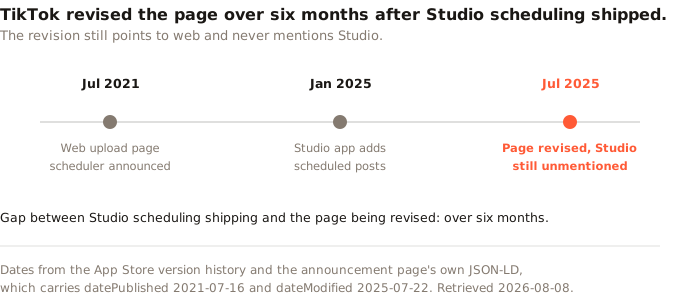
So the guides are not lazy so much as downstream. They are reading a page that TikTok itself updated after the fact and did not correct on this point. If you have ever wondered why "TikTok scheduling is desktop only" survives as received wisdom in 2026, that page is the likeliest source.
How to schedule a post on TikTok, step by step
TikTok publishes its own four steps under the heading "Here's how to schedule TikTok videos" (TikTok For Business), so here they are, three of the four carrying TikTok's own wording. Note the noun: can you schedule TikTok videos this way, yes, and the steps say nothing about anything else. Step 1 is "Log in to your account at tiktok.com on a web browser, and click on the Cloud icon at the top right-hand corner of your feed." Step 2 is the upload page, where you add the caption, cover image and privacy settings. Step 3: "toggle the schedule button and select a date and time to schedule your post." Step 4 is clicking schedule, after which "You can see your scheduled posts alongside drafts in the Profile view."
Two details on that page deserve more attention than they get. The first is a trap: "The time zone will default to your computer setting." If you plan a client's posts from a different time zone to theirs, that default is doing something you did not ask for.
The second is that the same page disagrees with itself about who may do this at all. Its opening describes a feature "that allows creators and Business Accounts to schedule a post up to 10 days in advance", and four paragraphs later it says "You'll need a Business Account in order to access desktop scheduling." Creators are in the first sentence and excluded by the second. We cannot resolve which is current from the page itself, so treat a Business Account as the safe assumption.
How to schedule TikTok posts on mobile
Use the TikTok Studio app rather than the main TikTok app. That is the whole answer, and it is why "can I schedule a post on TikTok from my phone" gets answered wrongly so often. TikTok's release note for the feature is quoted above; what it does not do is tell you the window, the edit rules or the account requirement for that surface, which is why three Studio cells in the comparison table further down read "not documented".
How far ahead can you schedule a TikTok post?
Fifteen minutes to ten days on the web upload page, the one surface TikTok documents. TikTok's wording is "You can schedule videos anywhere from 15 minutes to 10 days in advance of publishing" (TikTok For Business), and the account requirement discussed above applies on top of it. Switching account type is free, but it is a step, and it is the one most write-ups drop.
Read that as a range and not a limit, because the floor bites more often than the ceiling. A post you want out in five minutes cannot be scheduled at all; you publish it by hand or you wait. Ten days is the limit people notice, and it is why a monthly content calendar cannot live inside TikTok's web scheduler. Two weeks of planned posts do not fit.
Third-party tools are not bound by either number, and the reason is more interesting than the fact.
TikTok's posting API documents no publish-time field
Neither retrieved Content Posting API page gives a publish time anywhere to go. TikTok's direct-post reference documents the post_info object in detail, and none of the nine fields is a future publish time. One of them, video_cover_timestamp_ms, is a timestamp, which is worth naming so the distinction stays honest. TikTok defines it as specifying "which frame (measured in milli-seconds) will be used as the video cover". It points into the video, not at the clock. We counted the tokens across both retrieved developer pages, the direct-post reference and the Get Started page, rather than trusting a summary of them.
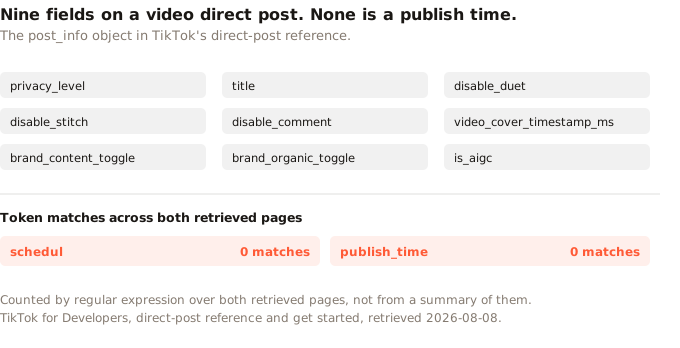
For a video direct post the documented fields are privacy_level, title, disable_duet, disable_stitch, disable_comment, video_cover_timestamp_ms, brand_content_toggle, brand_organic_toggle and is_aigc (TikTok for Developers). Searching both retrieved pages for the stem schedul returns zero matches, and the same for publish_time.
That absence shapes how any tool built on this API has to work. TikTok does expose other upload routes: the Get Started page names /v2/post/publish/inbox/video/init/ once, in passing, and a separate content endpoint handles photos. What neither retrieved page documents, on any route, is a way to hand TikTok a video and a time together.
So the tool keeps your video and watches the clock. At the target minute it calls the publish endpoint, exactly as it would if you had pressed the button yourself. When people say a post was "scheduled to TikTok", what happened is that it sat somewhere else until it was posted to TikTok normally.
Our finding: Zilfu works exactly that way, and we would rather show it than describe it. A scheduled post sits in our database with a
scheduled_attimestamp. A command runs every minute, selects the posts whose time has passed, and dispatches a publish job. The job builds apost_infoobject carrying privacy level and the comment, duet and stitch toggles, and no publish time, because there is nowhere to put one. A ten-day ceiling does not reach us, for the same reason it reaches no tool built on this endpoint: TikTok is not holding the post.
What you cannot change after scheduling on the web
The video, the caption and the time. TikTok is unusually direct about it: "As with regular posting, you won't be able to edit the video, captions, or scheduled time after scheduling the post" (TikTok For Business). Its documented remedy is "If you need to change what you've scheduled, you can delete the scheduled post and re-upload after making any edits."
That lock is the web scheduler's real cost, and it is larger than the ten-day ceiling. A caption typo spotted the evening before means deleting the post and uploading the video again. The video is the expensive part. TikTok has documented none of it for Studio.
One compensating detail on the web, also from TikTok: "When a scheduled video is posted, you'll receive a push notification to alert you that your post is live." Worth knowing, because it is the confirmation the web scheduler gives you without your having to go looking.
How do the three routes compare?
One table, three routes, six rows.
| Native web | TikTok Studio app | Third-party tool | |
|---|---|---|---|
| Available since | July 2021 | January 2025 | varies |
| Window | 15 min to 10 days | not documented | tool's own |
| Edit after scheduling | no, delete and re-upload | not documented | tool's own |
| Account type | Business Account, though the page contradicts itself | not documented | no TikTok requirement documented |
| Multiple accounts at once | no, inferred | no, inferred | yes |
| Holds the post | TikTok | TikTok, inferred | the tool |
Three cells say "not documented" on purpose. TikTok announced Studio scheduling in a release note rather than in documentation, so its window, its edit behaviour and its account requirement are not things we found stated anywhere by TikTok. Assuming they match the web scheduler's would be a guess, and this page would rather carry a gap than a guess.
Three more cells are marked "inferred", and they mean something different. Of the three Studio cells we do fill in, only the January 2025 date rests on a quotation. That it handles one account at a time, and that TikTok holds the post, both follow from it being TikTok's own scheduler inside TikTok's own app. Neither comes from a sentence we can point at. The web column's one-account-at-a-time cell is the same kind of reasoning. Nothing in the table is invented, but the marked cells are ours rather than TikTok's.
Can you schedule TikTok photo carousels?
Through a third-party tool, yes. Natively, we could not establish it either way. TikTok's scheduler announcement never mentions photo posts in the version we retrieved, which is the 2025 revision, and its four steps describe how to schedule a TikTok post that is a video. Silence is not a no, and we found no TikTok source that settles it. The App Store notes confirm Studio posts photos ("Easily post videos and photos on TikTok Studio", version 41.9.2, 19 December 2025, App Store) but posting photos and scheduling photos are different claims, and TikTok makes only the first.
On the API side the path is clear enough. Photos publish through a content endpoint with media_type set to PHOTO, on the same immediate-publish model as video, so a tool that can queue a video can queue a carousel. Zilfu sends the photo set with the cover index fixed to the first image.
Which way should you schedule?
Match the route to what you are actually doing.
- One account, one post, sometime this week. Can you schedule a post on TikTok natively and be done? Yes, web or Studio, and it costs nothing, though the web scheduler wants a Business Account first and Studio's window is not documented. Just be sure the post is finished: on the web you cannot revise it, and TikTok has not documented whether Studio behaves differently.
- A calendar longer than ten days. The documented ten-day ceiling rules out the web scheduler, and TikTok has not published Studio's window, so a tool is the only route with a stated answer.
- More than one TikTok account. Neither native surface appears to schedule more than one account at a time, so running multiple accounts from one queue is the thing third-party tools exist for.
- Posting to TikTok and elsewhere together. Once a second network is involved you are choosing a scheduler, not a TikTok feature. Our guide to posting to multiple accounts at once covers that case.
- Publishing from your own code or an assistant. TikTok's API will not take a time from you, so scheduling has to live in something that holds the post. A scheduling API is that something.
Timing itself is a separate question from mechanism, and a contested one. Our best time to post on TikTok piece works through why the published studies disagree.
Where Zilfu fits, and where it does not
Zilfu schedules TikTok videos and photo carousels from one queue. Videos carry privacy level plus the comment, duet and stitch toggles. Carousels carry privacy level and comments, because we send no duet or stitch field on a photo post. Branded content disclosure is set per post either way. There is no ten-day ceiling, because the post is ours to hold until it fires. Scheduling is on every plan including Free, which covers 2 connected accounts and 15 posts a month without a card, and the same scheduling behaviour is reachable from the REST API and MCP server.
Three honest limits. Our scheduler resolves to the minute, not the second, because the dispatcher runs on a one-minute tick, and TikTok's own processing adds a further delay once the upload is in its hands. Publishing can still fail at TikTok's end after we hand the post over, in which case the post moves to an Error state and we email you the failure message. And we cannot do anything about TikTok's own rules on the post itself, because we are calling the same endpoint everyone else calls.
Honestly summarised, "can you schedule TikTok posts" has two answers wearing one question. TikTok's web scheduler can hold a post for up to ten days and will not let you touch the video, caption or time afterwards. A tool that holds the post itself is bound by neither, and can let you edit until the minute it fires. Only the routes TikTok holds, the web scheduler and, as best we can tell, Studio, are scheduling in the sense of telling TikTok when to publish. A tool-held queue is not, because the direct-post reference documents no field for a publish time.
Sources
- TikTok For Business, Video Scheduler: Plan TikTok Videos In Advance, published 2021-07-16, modified 2025-07-22, retrieved 2026-08-08, https://ads.tiktok.com/business/en/blog/introducing-video-scheduler-now-you-can-plan-tiktoks-in-advance
- Apple App Store, TikTok Studio by TikTok Ltd., version history 37.3.0 (2025-01-09) and 41.9.2 (2025-12-19), retrieved 2026-08-08, https://apps.apple.com/us/app/tiktok-studio/id6478151677
- TikTok for Developers, Content Posting API direct post reference, retrieved 2026-08-08, https://developers.tiktok.com/doc/content-posting-api-reference-direct-post/
- TikTok for Developers, Content Posting API get started, retrieved 2026-08-08, https://developers.tiktok.com/doc/content-posting-api-get-started/